
Here are the new features and improvements in Autologica Sky DMS that help streamline tasks, uncover opportunities, and improve results.
Service
Technician Efficiency
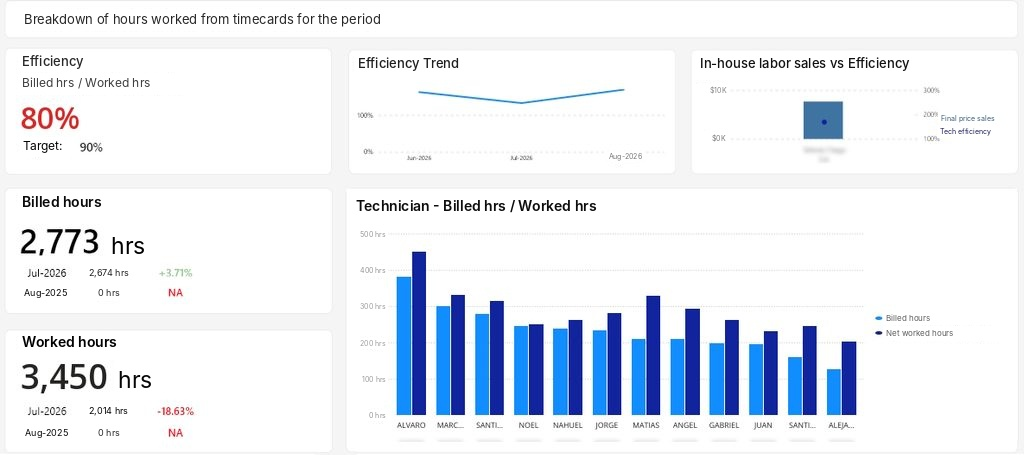
Are you a Service Manager? We’ve added the Shop Efficiency indicator to the Monthly Conclusions dashboard in Autologica Analytics. This KPI compares the labor hours billed against the hours technicians logged on their time cards.
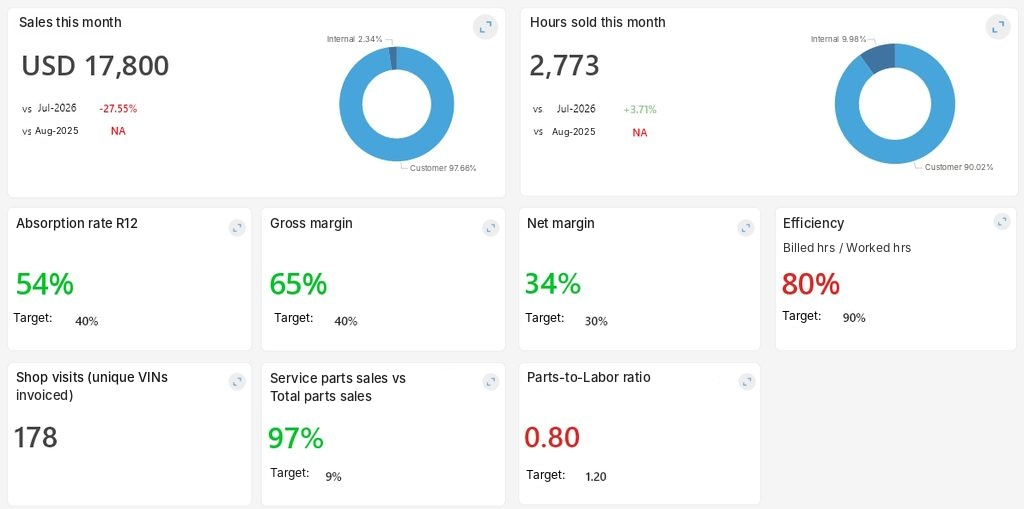
From the Efficiency card, you can drill down into the analysis to see:
- Monthly trend.
- Comparison with the previous month and with the same month last year.
- Efficiency by branch and by technician.
- With this KPI, you can quickly identify who is below target and focus training where it’s really needed.
And for those who need to dig deeper, a third level shows each repair order and each time card that make up the indicator.
For the data to be reliable, each repair order must have both the billed hours and the technician’s logged work hours entered.
Vehicles
Bulk Creation and Update from a File
Keeping each unit’s data up to date, from the moment it’s produced at the factory until it’s sold, no longer means entering it one by one. With the new vehicle interface, a single CSV file is enough to process all your units.
Creates new units and updates the data of existing ones.
Assigns the options loaded in the model.
Creates the purchase request for each unit and links it.
Updates the factory status as production progresses.
Each record is validated before processing to avoid duplicates and inconsistencies. If something doesn’t match, the error report shows the file line, the field, and the reported value so you can correct it quickly.
To enable the interface, contact Autologica Support.
Cash Register
New Payment Type Field in Other Payment Methods
The Other Payment Methods setup now includes a Payment Type field, which lets you define more than one foreign-currency payment method depending on how each one is used:
- Payment in local currency.
- Payment in foreign currency, which automatically takes the exchange rate from the voucher.
- Cash payment in other currencies.
- Other payment type.
- This lets you record commissions or non-deductible amounts in foreign currency without calculating the exchange rate by hand.
Positive and Negative Rounding on Cash Receipts
When manually entering a cash receipt, it’s common for the total of the payment methods to differ from the voucher total by a few cents. Until now, if that difference was negative, the voucher couldn’t be saved.
Starting with this version, when you confirm the receipt, the system automatically generates a payment for the rounding difference, whether positive or negative, using the rounding payment method defined by the dealership. The difference is recorded for review, and the configured maximum amount still works as a limit: if the difference exceeds it, no adjustment is made.
This way, a manually entered cash receipt behaves the same as one generated by the automated cash register processes.
Uruguay Exclusive
IMESI Tax Improvements
In Uruguay, importing dealerships must calculate the IMESI (Specific Internal Tax) when invoicing each vehicle and pay it the following month. It’s a variable tax: it depends on the model (engine displacement and fuel type) and the type of taxpayer. It doesn’t change the amount the customer pays, but it must be reflected in the accounting of each sale.
With the latest update, Autologica Sky DMS calculates the IMESI automatically and itemizes it in the sales journal entry. Entering it manually is no longer necessary. Some key features:
- Rate by model. It’s defined once on each model, which is the level at which the tax applies in Uruguay.
- Based on customer status. The system applies the percentage that corresponds to final consumers or registered taxpayers.
- Fixed assets. If the vehicle is sold as a fixed asset and the model has a reduction percentage, the base is adjusted before the calculation.
- Internal operations included. Vehicles assigned to test drives or other internal operations covered by the tax also generate their journal entry.
- Setup is completed in three configuration steps: the tax’s accounting accounts, the rates for each model, and the voucher types for internal operations. From there, the IMESI is calculated automatically on every new-vehicle sales invoice or credit note.
This way, the accounting for each sale is complete from the start, with fewer manual tasks and less room for error when settling the tax.
Renault Integrations
Improvements to Renault’s BDCF Interface
The BDCF interface lets Renault dealerships report their billing to the manufacturer automatically: it generates a file with the vouchers issued for vehicles, parts, and services, and sends it directly to Renault.
Now, each file name includes the generation date and time, so every submission is uniquely identified. This prevents the manufacturer from discarding files because their names match previously sent ones, and ensures the billing information arrives complete.
Subscribe to the blog
Receive the new articles via email. No spam; you can unsubscribe whenever you want.